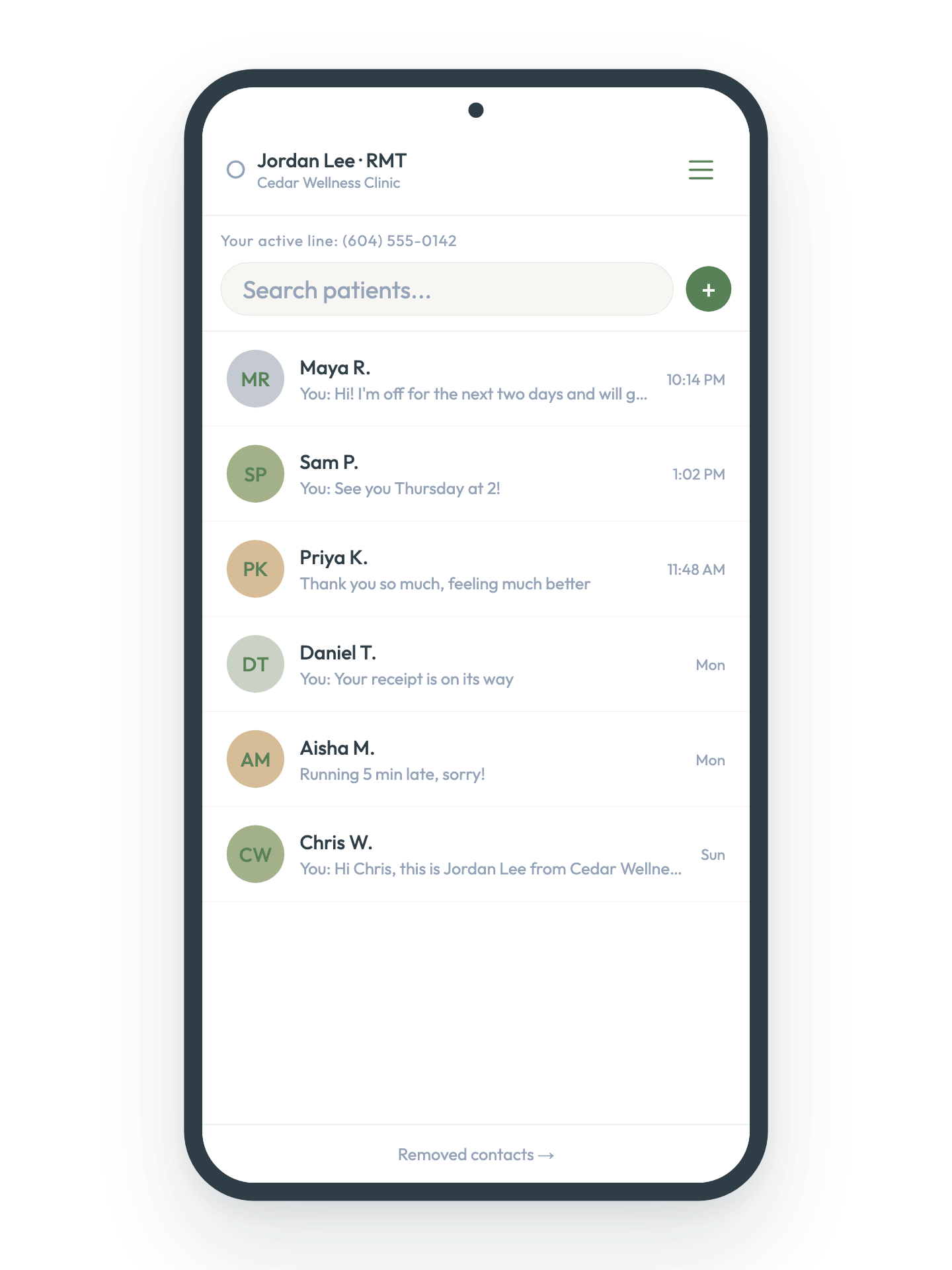
Stop seeing work texts on your day off.

You know that feeling when you call a patient from your personal number and immediately wish you hadn't? CUB Line gives you a dedicated BC clinic line that lives in your browser — so your personal number stays personal, your patients always recognize your call, and work stays at work.

Your first 7 days are on us. Limited early access spots available.

Your new normal

Here's what that actually looks like.

Before CUB
Patients text your personal number at 10pm
You feel obligated to respond on your day off
You call a patient and immediately wish you hadn't
Your personal number is saved in their phone forever
Work bleeds into every part of your life
After CUB
🌿Patients text your clinic number — not you personally
🌿Off duty means actually off duty
🌿Patients always recognize your clinic number calling
🌿No more hesitations before calling patients.
🌿Reclaim your time off.

How it works

Simple for you. Invisible to them.

1
Choose your BC clinic number
Pick a 604, 778, 236 or 250 number that belongs to your practice. No second phone, no second SIM. It lives in your browser — or on your iPad like an app.
2
Patients reach out like normal
Share your clinic number the way you'd share any number. Patients text and call from their regular phone — no app, no account, no friction.
3
You stay in control
Reply from your iPad, check messages on your laptop, call patients from anywhere. Your clinic number shows on their caller ID. Your personal number never does. Set yourself Off Duty when your day is done — and actually mean it.
🌿 Your patients never need to download an app, create an account, or change anything about how they communicate with you. CUB is invisible to them — and that's exactly the point.
Your inbox. Finally separate. Your personal inbox wasn't meant to be a waiting room. CUB keeps all patient messages in one dedicated space — out of your family group chats, away from your personal texts, and completely separate from your everyday life. When you're off, you're actually off.

From the Founder

I built CUB because I was tired of the dilemma.You're running late to the clinic and you call your patient to let them know — from your personal number. The moment they pick up, you realize what you've just done. Now they have it. And eventually, they'll use it.They text you on a Sunday. You're with your family. You see the notification and your stomach does that thing. Do you reply? You don't want to seem cold. You do want to book them in. But you were finally, actually off.That moment — that tiny pull back into work when you were supposed to be free — is how burnout starts. Not dramatically. Just slowly, over and over, until the work you loved starts to feel like something you can't escape.I believe deeply that longevity in this career depends on taking care of yourself. We chose professions built around helping people — and that's exactly why the boundary matters so much. You can't pour from an empty cup, and a blurred boundary is a slow leak.CUB exists so you don't have to choose between being reachable and being present. Your patients reach your clinic line. Your personal life stays yours. And the life you're working to build — you actually get to live it.

— Jamie, RMT & Founder

What's coming

CUB is just getting started.

Beta members get early access to every feature as it launches.

Now

Dedicated BC clinic number
Two-way SMS with patients
Voice bridge calls
Status management (Active, In Session, Off Duty)
Push notifications
Days off scheduling with auto-replies
Quick reply shortcuts
Bulk SMS sending/broadcast messaging
iPad and Android optimized layout
Chat history export
In-app onboarding guide

Coming soon

Native iOS and Android app function
Quiet hours scheduling
MMS support—receive and display images from patients
Voicemail transcription
QR code for quick contact sharing
Multiple clinic numbers per account
Multiple users per line (clinic/team plan)
Booking link quick action button
Referral program perks
Number porting

Trust & Compliance

Built for the BC Healthcare Landscape.

We believe protecting your patients' data is just as important as protecting your own privacy. CUB Line is built to align with Canadian privacy standards — giving solo practitioners the peace of mind to focus on what matters most.BC PIPA Compliance
Designed specifically for private practitioners in British Columbia. We handle the compliance so you can focus on care.
Bank-Level Encryption
Your data is protected by AES-256 encryption at rest and TLS encryption in transit. We partner with Supabase and Twilio — industry-leading infrastructure providers that meet the same standards used by financial institutions.
Privacy-First Architecture
Patient communications are protected by row-level security — your messages are never accessible to other practitioners. We follow a Minimum Necessary data policy. We facilitate your professional bridge, but we never sell your data.
Professional Accountability
We partner exclusively with Tier-1 providers to maintain a chain of compliance. We maintain data processing agreements with every third-party provider in our infrastructure — so the same privacy standard applies end to end.

Join cub

One simple plan. Total Privacy.

CUB Line— $29/month

500 minutes of local calling & unlimited text messages
Dedicated 604, 778, 236 or 250 number of your choice (subject to availability)
Secure app access on any device — internet browser or iPad
BC PIPA/PIPEDA compliant infrastructure
A professional business line — another deductible expense for your practice

The Founding 50

$14.99/month
(retail price: $29/month)

We're opening CUB to 50 BC practitioners before public launch. Join now and lock in 50% off for life — your rate never changes as long as you stay subscribed.

Standard Plan
$29/month

Everything in Founding 50, at full price.

Got questions?

Everything you need to know.

CUB gives you a dedicated BC clinic phone number that lives right in your browser. Text and call patients from your clinic number without ever giving out your personal number — no second phone, no second SIM card.

You need a Google account to sign in and a device with a modern browser. Setup takes about 5 minutes and your clinic number is ready to use immediately.

CUB works on any device with a modern browser — Mac, Windows, iPad, iPhone, and Android. No download required. Just open app.getcubsuite.com and sign in.

On iPad, use Safari for the best experience — it supports Add to Home Screen and push notifications. On Mac or Windows, use Chrome. On Android, use Chrome for the best experience. Tap the three-dot menu → Add to Home Screen to install it like an app. CUB is a web app so no download is required on any device.

Yes — open app.getcubsuite.com in Safari on your iPhone. For the best experience, tap Share → Add to Home Screen to install it like a native app.

Yes — add your CUB clinic number to your personal contacts with a name you'll recognize instantly, like "CUB Line" or "Clinic Line". This way you'll always know when a patient is calling back on your clinic line and never miss them.

Adding CUB to your home screen gives you the most stable experience. It removes the browser navigation bar, prevents accidental back button presses, and makes push notifications work more reliably. In Safari tap Share → Add to Home Screen → Add. Always open CUB from your home screen icon going forward — not from the browser.

If CUB appears stuck on loading, simply close the app completely and reopen it from your home screen icon. This refreshes the app to the latest version. If it still doesn't load, go to Settings → Safari → Clear History and Website Data, then reopen CUB from your home screen.

If messages appear blank after waking your iPad, simply close CUB and reopen it from your home screen. This is a known limitation of web apps on iOS and takes just a second to fix.

Go to app.getcubsuite.com and click Sign in with Google. Use the Google account you want associated with your CUB account. This is the email your billing and account details will be tied to.

Enter your name, clinic name, and profession type. This personalizes your quick action messages and helps patients recognize who is texting them.

This is the number CUB calls first when you initiate a voice call to a patient. Your personal number stays completely hidden — patients only ever see your clinic number on their caller ID.

Choose a BC area code (778, 236, 604, or 250) and search for available numbers. Pick one that feels right for your practice and claim it — this becomes your permanent clinic line.

Tap the hamburger menu in the top right to set your status. Active means you're available. In Session means you're with a patient. Off Duty means you're done for the day — set this every evening so work stays at work.

Go to Settings and write your auto-reply message. Enable it so patients automatically receive a warm response when you're Off Duty. Something like "Hi! I'm currently off duty and will get back to you during my next clinic day" works well.

This is the most important step for a stable experience. In Safari tap Share → Add to Home Screen → Add. Always open CUB from your home screen icon going forward. Once opened from your home screen, allow notifications when prompted so you never miss a patient message.

Tap the + button to start a new conversation. Enter your patient's number and use the Intro quick action to introduce your new clinic line. From now on all your patient communication goes through CUB — your personal number stays personal.

You give patients your clinic number just like you would a regular phone number. They text it from their phone and the message shows up instantly in your CUB inbox.

Yes — your clinic number appears as the sender on every message and call. We recommend introducing yourself the first time so patients save your number.

Every message is safely saved in your inbox. You'll receive a notification so you always know when something is waiting.

Absolutely — just click the + button to start a new conversation with any phone number. Perfect for a quick check-in, a pre-call heads up, or any direct message you want to send from your clinic line.

Use the Intro quick action chip in the message box. It sends a warm, professional introduction letting patients know this is your clinic line — so they save your number and recognize you next time.

CUB currently supports text messages only. Image and file sharing is on our roadmap and coming soon.

When you call a patient through CUB, your personal phone rings first. Answer it and your patient's phone rings — you're connected, with your clinic number showing on their caller ID.

Your dedicated clinic number always shows — never your personal number. Patients will recognize your clinic line and know it's you calling.

Yes — if a patient calls your clinic number, CUB will forward the call to your personal phone. Your personal number stays completely hidden throughout.

Use the Pre-call quick action to send a text before you dial. It gives patients a heads up that an unfamiliar number is about to call — dramatically increasing the chance they'll pick up, especially the first time.

Yes, but you need to save your clinic number in your personal contacts first. Call Control screens calls from unknown numbers — once your clinic number is saved, it's recognized as trusted and calls connect normally.

We also recommend sending your patient a Pre-call message before calling them. If they save your clinic number too, their Call Control won't block the call on their end either.

document.querySelectorAll('.faq-category-btn').forEach(btn => { btn.addEventListener('click', () => { const group = btn.nextElementSibling; const isOpen = group.classList.contains('open'); document.querySelectorAll('.faq-group.open').forEach(g => { g.classList.remove('open'); g.previousElementSibling.classList.remove('open'); }); if (!isOpen) { group.classList.add('open'); btn.classList.add('open'); } }); }); document.querySelectorAll('.faq-question').forEach(btn => { btn.addEventListener('click', () => { const item = btn.parentElement; const isOpen = item.classList.contains('open'); item.closest('.faq-group').querySelectorAll('.faq-item.open').forEach(i => i.classList.remove('open')); if (!isOpen) item.classList.add('open'); }); });

Active means you're available and will receive message notifications as normal. In Session means you're with a patient — a good reminder for yourself to check messages after. Off Duty means you're not working — set it whenever your day is done.

Messages still come through and are safely saved in your inbox — you just won't be interrupted by notifications. This is the whole point of CUB: your patients reach your clinic line, not your personal number, so you can truly switch off whenever your day is done.

When you're Off Duty and a patient texts your clinic number, CUB can automatically send them a friendly message letting them know you'll be in touch. You write the message yourself in Settings — keep it warm and set the right expectation.

Yes — every message is saved and waiting for you when you're back. Think of it like a clinic answering machine, except the messages are organized and ready to reply to.

Yes — go to Settings and enable the In Session auto-reply. Write a message like "Hi! I'm currently with a patient and will get back to you shortly." Patients get an immediate response and you stay focused on your session.

Enable notifications when prompted after signing in. CUB will send you a notification whenever a new message arrives — even when the app isn't open.

Open CUB in Safari, tap Share → Add to Home Screen, then open CUB from your home screen. Safari will prompt you to allow notifications — tap Allow. For persistent notifications, go to Settings → Notifications → CUB and make sure Allow Notifications is turned on.

Open CUB in Chrome at app.getcubsuite.com. You'll be prompted to allow notifications — click Allow. If you missed it, go to System Settings → Notifications → Google Chrome and turn on Allow Notifications.

On desktop, notifications are delivered through your browser so the browser icon appears alongside the CUB icon. On iPad, add CUB to your home screen from Safari for a cleaner notification experience that shows only the CUB icon.

Long press the CUB icon → Edit Home Screen → tap the X in the corner of the icon → Remove.

Yes — CUB is built specifically for BC health practitioners and designed to meet the requirements of BC's Personal Information Protection Act. Your patient communications are stored securely and never shared with third parties.

Only you. Every practitioner's messages are protected by row-level security — meaning no other CUB user can ever access your conversations, even if they're on the same platform.

Never. We facilitate your professional communication but your data belongs to you. We follow a Minimum Necessary data policy — we only store what's needed to make CUB work.

Every plan includes your dedicated BC clinic number, unlimited SMS messaging, 500 minutes of local calling, and access on any device. Everything you need — nothing you don't.

Yes — no contracts, no cancellation fees. You can manage your subscription anytime through the billing portal in your Settings.

At the end of your trial your chosen plan activates and your first payment is processed. If you selected the Founding 50 plan your rate is locked in for life. You'll receive a reminder before your trial ends.

Yes — as a dedicated business communication tool, your CUB subscription is a professional business expense and may be tax deductible. Your invoices are available anytime through Settings → Manage Billing. We recommend confirming with your accountant, but for most self-employed health practitioners in Canada this applies.

Yes — 5% GST is automatically calculated and applied at checkout. Your invoices include a full GST breakdown for your records.

All your invoices are available anytime through Settings → Manage Billing. From there you can view, download, and print your billing history for your records.

document.querySelectorAll('.cub-faq2-cat-btn').forEach(function(btn) { btn.addEventListener('click', function() { var group = btn.nextElementSibling; var isOpen = group.classList.contains('open'); document.querySelectorAll('.cub-faq2-group.open').forEach(function(g) { g.classList.remove('open'); g.previousElementSibling.classList.remove('open'); }); if (!isOpen) { group.classList.add('open'); btn.classList.add('open'); } }); }); document.querySelectorAll('.cub-faq2-q').forEach(function(btn) { btn.addEventListener('click', function() { var item = btn.parentElement; var isOpen = item.classList.contains('open'); item.closest('.cub-faq2-group').querySelectorAll('.cub-faq2-item.open').forEach(function(i) { i.classList.remove('open'); }); if (!isOpen) item.classList.add('open'); }); });

Your clinic line is waiting.

CUB is currently in early access for BC health practitioners.
Your first 7 days are on us — cancel anytime.
Questions? [email protected]

Stay in the loop.

Tips, product updates and what's coming next for CUB.

We value your privacy as much as your patients'. Unsubscribe at any time.

Contacts

CUB Suite: Privacy Policy

Last Updated: April 20261. Our Commitment to Clinical PrivacyCUB Suite is designed specifically for regulated healthcare practitioners in British Columbia. Our guiding principle is the "Minimum Necessary" standard — we only collect and process data that is strictly required to deliver our service. We are committed to aligning with the BC Personal Information Protection Act (PIPA) and Canada's Personal Information Protection and Electronic Documents Act (PIPEDA).2. Data We Collect and How We Use ItPractitioner Account Data: When you create an account, we collect your name, clinic name, email address, and professional phone number. This information is stored securely in our database and is used solely to operate your CUB Line workspace.Patient Contact Information: When you initiate an SMS or voice call, the patient's phone number is used exclusively to route that communication through our secure telephony bridge. We do not build patient profiles or use this data for any purpose beyond message delivery.Communication Records: SMS messages sent and received through your CUB clinic number are stored in our secure database to power your in-app message history. This data is isolated to your account and is never accessible to other practitioners. You may export or delete your message history at any time from within the app.Payment Information: Subscription billing is handled entirely by Stripe. CUB Suite never sees or stores your credit card details. We retain only your subscription status to manage your access to the platform.3. Third-Party Secure ProcessorsWe partner with industry-leading infrastructure providers:Supabase: Your account data and message history are stored in Supabase, a SOC 2 compliant cloud database hosted on AWS infrastructure with AES-256 encryption at rest.Twilio: Patient phone numbers and SMS content are transmitted via TLS-encrypted protocols through Twilio to facilitate communication. Twilio is a globally recognized Tier-1 telephony provider.Vercel: Our backend API is hosted on Vercel's secure serverless infrastructure, protected by 256-bit SSL/TLS encryption in transit.Stripe: Payment processing is handled by Stripe, a PCI-DSS Level 1 certified payment processor. CUB Suite does not store payment card data.4. Security SafeguardsEncryption in Transit: All data transmitted between the app, our API, and our database is protected by 256-bit SSL/TLS encryption.Encryption at Rest: All stored data is encrypted at rest using AES-256 standards.Access Controls: Your data is protected by Row Level Security policies — our database is architected so that each practitioner can only access their own records. No practitioner can access another's patient communications.No Data Selling: CUB Suite does not, and will never, sell practitioner or patient data to third parties or advertisers.5. ComplianceCUB Suite is built to support your existing privacy obligations as a BC-based regulated health professional.BC PIPA: We align with the Personal Information Protection Act (BC), focusing on consent, limited collection, and individual access rights.PIPEDA: We adhere to Canada's federal privacy framework for commercial activity, including the 10 fair information principles.CUB Suite is currently available exclusively to practitioners operating within British Columbia.6. Data Retention and DeletionYou maintain full control over your data. You may export your complete message history as a CSV file at any time from within the app. To request complete account deletion, including all stored communications and practitioner data, contact us at [email protected] and we will process your request within 30 days.7. ContactFor any privacy-related questions or concerns, please contact our Privacy Lead at [email protected].


Terms of service

1. Acceptance of TermsBy accessing getcubsuite.com, joining the waitlist, or installing and using CUB Line ("the App"), you agree to these Terms of Service. If you do not agree, please do not use our services.2. Description of ServiceCUB Suite provides a dedicated clinic phone line and communication tool for regulated health practitioners in Canada. CUB Line is an app that enables SMS messaging and voice calls through a dedicated local phone number. CUB is a communication facilitation tool only — it is not a clinical records system, electronic health record, or charting platform.3. EligibilityCUB Line is intended for use by regulated health professionals operating within Canada. By using the service you confirm that you are a licensed or regulated health practitioner and that you will use the service in compliance with your professional obligations and applicable Canadian privacy law.4. Beta ProgramCUB Line is currently in beta. During the beta period: features may change, be added, or be removed without notice. Service interruptions may occur. Pricing and plan details are subject to change before public launch. CUB Suite is not liable for any disruption to your practice resulting from service unavailability during beta.5. Subscription and BillingSubscriptions are billed monthly through Stripe. You may cancel at any time. Cancellation takes effect at the end of your current billing period. The Founding 50 rate is locked in for the lifetime of your subscription as long as it remains active and in good standing. CUB Suite reserves the right to change pricing for new subscribers at any time.6. Your Clinic NumberYour dedicated clinic number is provisioned through Twilio and remains active as long as your subscription is active. If your subscription lapses beyond the grace period, your number may be released and reassigned. CUB Suite is not liable for any consequences resulting from loss of a phone number due to subscription cancellation or non-payment.7. Acceptable UseYou agree to use CUB Line only for lawful professional communication with your patients, and not for spam, harassment, or any communication that violates Canadian law or your professional regulatory obligations.Permitted use:CUB is designed exclusively for professional health practitioner communication with patients in British Columbia — SMS and voice communication consistent with your regulatory and ethical obligations.Prohibited use:- Sending unsolicited messages (spam) of any kind
- Bulk or automated messaging not initiated by you personally
- Any communication that violates Canada's Anti-Spam Legislation (CASL)
- Using CUB for any illegal purpose
- Harassment, abuse, or threatening communication
- Reselling, sharing, or transferring your clinic number to another person
Fair Use:While CUB offers unlimited SMS messaging, this is intended for normal clinical communication volumes. We reserve the right to investigate and suspend accounts showing unusual messaging patterns that suggest misuse or automated sending.CUB Line uses VoIP technology provided by Twilio and is not intended for emergency use. Attempting to contact 911 or other emergency services through your CUB clinic number may result in a $100 USD fee charged by Twilio, which will be passed on to the account holder. Always use a traditional phone line or mobile device to contact emergency services. Patients should always
have independent access to emergency services (911) and crisis lines.
CUB clinic numbers are VoIP numbers and may not be accepted for SMS-based two-factor authentication, such as by banks or government services.8. PrivacyYour use of CUB Suite is governed by our Privacy Policy above. By using the service you consent to the data practices described therein.9. Disclaimer of WarrantiesCUB Suite is provided "as is" without warranties of any kind. We do not guarantee uninterrupted service, and we are not liable for any loss of data, missed communications, or disruption to your practice.10. Limitation of LiabilityTo the maximum extent permitted by Canadian law, CUB Suite's total liability to you for any claim arising from use of the service shall not exceed the amount you paid in the three months preceding the claim.11. Governing LawThese Terms are governed by the laws of British Columbia, Canada. Any disputes shall be resolved in the courts of British Columbia.12. Changes to TermsWe may update these Terms at any time. Continued use of the service after changes constitutes acceptance of the new Terms. We will notify active users of material changes by email.13. ContactFor questions about these Terms, contact us at [email protected].